Built for South African accountants
AI Invoice Automation for South African Accountants
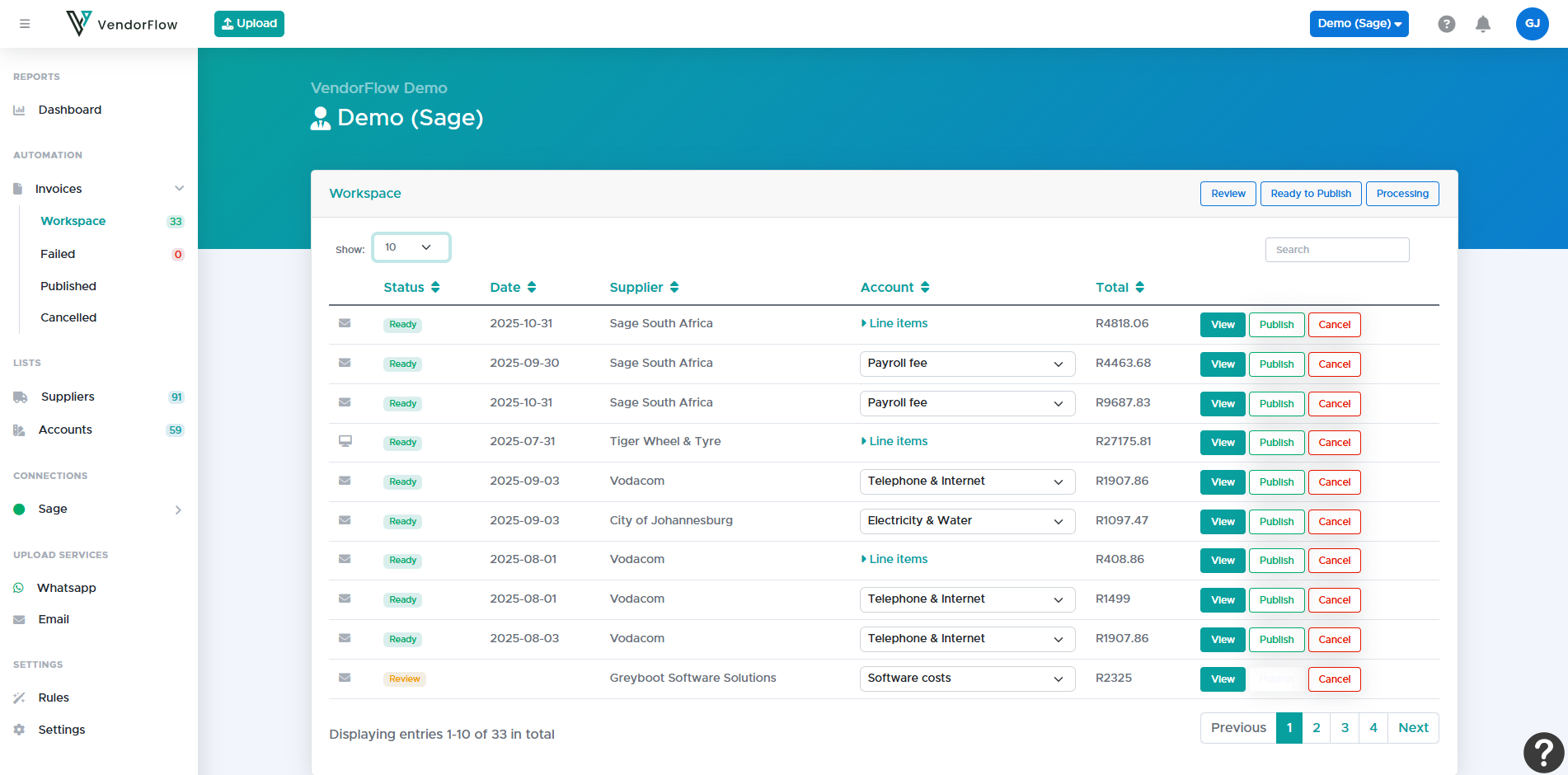
Capture supplier invoices via WhatsApp, email, or upload. VendorFlow extracts the data, applies the correct VAT treatment, and posts directly into Xero or Sage — no manual capturing required.
Works with your accounting software


Built for the Way South African Firms Actually Work
South African invoices are inconsistent. VAT treatment isn't always obvious. Clients send documents late — often by WhatsApp. VendorFlow is designed for this reality.
- Save hours every week on invoice capture
- Lock down recurring suppliers with rules
- Reduce VAT errors caused by manual entry
- Built-in controls that flag duplicates and inconsistencies
- Cleaner ledgers with consistent allocations and descriptions
- Scales across multiple clients with unlimited staff
- Lets juniors capture less and reviewers review more
What VendorFlow Automates
Every part of the invoice workflow — from capture to posting — handled automatically, with your team in control of exceptions.
AI Invoice Capture
Reads any invoice format — PDF, image, scanned document, WhatsApp photo. Extracts supplier, date, line items, and totals with 99%+ accuracy.
Rules-Based Processing
Define per-supplier rules — account, VAT treatment, expected value range. Routine invoices post automatically. Your team only reviews exceptions.
Supplier Matching
Automatically matches invoices to known suppliers regardless of spelling variations, trading name differences, or new branch formats.
Context-Aware GL Mapping
Maps line items to GL accounts using both AI understanding of the invoice and your defined chart of accounts. Learns from your corrections over time.
SARS VAT Classification
Correctly handles standard-rated, zero-rated, and exempt items. Validates supplier VAT registration numbers and flags unregistered vendors.
Consistent Descriptions
Generates clean, standardised narrations for every transaction so your ledger is readable and audit-ready — not a jumble of supplier reference numbers.
Xero & Sage Integration
Reviewed invoices post directly into Xero or Sage via API. No CSV exports, no copy-paste, no double-capture. The ledger is always up to date.
Duplicate Protection
Checks supplier name, invoice number, and value before every post. Flags or blocks duplicates automatically — even across multiple WhatsApp submissions.
Audit Trail
Every invoice has a complete processing history — who submitted it, what the AI extracted, what rules applied, and who approved it. Ready for any review.
From WhatsApp to Xero in minutes
Set up once, then let VendorFlow handle your invoice workflow automatically — every day.
Submit invoices any way you like
Forward invoice emails, snap a photo on WhatsApp, drag and drop PDFs, or upload directly. Clients and staff can send invoices the way they already work — no new apps needed.
AI extracts, validates & categorises
VendorFlow reads every invoice, validates the supplier VAT number, matches your rules engine, and applies the correct GL account and VAT treatment — automatically.
Review exceptions, post everything else
Routine invoices post directly to Xero or Sage. Your team only reviews flagged exceptions. Cleaner ledgers, fewer errors, less time spent on capturing.
Duplicate Protection
Every invoice is checked against supplier name, invoice number, and value before posting. No silent double-captures.
Supplier Matching
Known suppliers are matched automatically across name variations and trading name differences. No ghost entries.
Review Queue
Anything outside your rules goes into a review queue — not silently posted. Your team stays in control.
Full Audit Trail
Every invoice has a complete history: who submitted, what was extracted, which rules applied, who approved.
Built-In Controls Accountants Can Rely On
Invoices don't silently duplicate, bypass controls, or overwrite data — even when clients submit via WhatsApp. VendorFlow adds a structured layer of review and validation that manual processes can't provide.
Your rules define what normal looks like. VendorFlow enforces them automatically and escalates anything that doesn't fit.
What Local Firms Are Saying
Used by 50+ South African accounting firms processing over 10,000 invoices every month.
"VendorFlow has completely changed the way we process client invoices. What used to take our team hours every week now happens automatically. The WhatsApp capture is a game-changer — our clients already know how to use it."
"The VAT classification alone is worth it. We were spending too much time manually checking VAT treatments for different suppliers. VendorFlow handles it consistently and flags anything unusual for our review."
"We manage accounts for a large number of congregations. VendorFlow lets our small team keep up with the volume without adding headcount. The duplicate detection has already saved us from several costly double-payments."
"Our junior staff used to spend most of their time on capturing. Now they spend their time reviewing exceptions and helping clients. VendorFlow has genuinely changed what our team is able to do."
Explore the Next Step
Go deeper into industries, pricing, and practical guides
See who VendorFlow supports
Explore the accountant-first focus and the property-management workflows supported today.
View industriesRead comparisons and guides
Browse practical content on invoice automation, VAT-sensitive workflows, and VendorFlow vs Dext.
Read articlesUnderstand how pricing scales
See business, accounting, and property packages with tiered pricing and hybrid billing at higher usage.
View pricingFrequently Asked Questions
Answers to the questions firms ask most often about VendorFlow, pricing, VAT handling, and workflow fit.
What is VendorFlow?
How does VendorFlow handle South African VAT?
Can invoices be sent via WhatsApp?
Does VendorFlow integrate with Xero and Sage?
How does VendorFlow prevent duplicate invoices?
What is the rules engine in VendorFlow?
How many accounting firms use VendorFlow?
Is there a free trial?
How is VendorFlow priced?
Can VendorFlow handle multiple clients and companies?
Ready to automate your invoices?
Start your 14-day free trial. 25 invoices included. No credit card required.